- cross-posted to:
- linux@programming.dev
- cross-posted to:
- linux@programming.dev
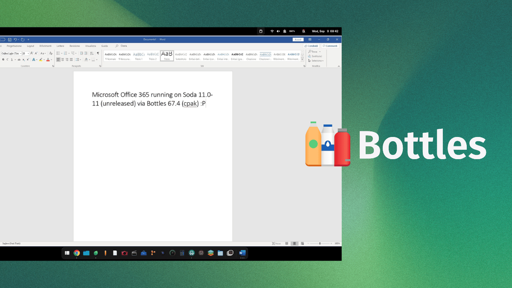
Mirko Brombin, the creator of Bottles, has got Microsoft 365 running on Linux. His posts on X showcase an installation that completes on a Windows 10 or 11 Wine prefix, signs in with his existing license, and launches at least one editor.
He achieved this using two things, an unreleased version of Soda and Bottles 67.4. If you remember, Soda is a Wine-based runner that facilitates easy running of Windows games and applications.
On first glance, what he posted might look like a developer-focused log, but these changes are the foundation of what full Microsoft 365 support via Bottles will one day hopefully look like.
The results of his work
Mirko was able to login into the MS 365 app using his credentials and was able to launch MS Word and use it. Of course that’s not the only thing he got working; since two-factor authentication passed, the suite detected his license, and OneDrive integration was functional.
The memory footprint of the office suite was less than 500MB, so this should be light on your Linux system.
The build he is currently testing is 2608 (20326.20144), which he says is the last build the installer will offer for Windows 10 and 11. And before you get all hyped up, wanting to try this out on your computer, know that you will have to wait.
Soda 11.0-11 (error 404 for now) has no release yet, and the component catalog that ships with Bottles 67.4 stops at Soda 11.0-10. Even the long-standing community request for a Microsoft Office installer in Bottles is still open.
Do we need Microsoft 365 on Linux?
Till date, there’s not been an official Linux desktop build of Microsoft 365, and seeing how Microsoft currently operates, I don’t expect one to appear anytime soon.
What’s been achieved here is remarkable. Once fully implemented, this will help draw in people into Linux, as many shudder at the thought of switching to the platform because their preferred office suite doesn’t work here.
For context, CodeWeavers sells a paid Wine product, CrossOver, and its database still lists Microsoft Office 365 on Linux as “Installs, Will Not Run,” last tested against CrossOver 26.3.0.
Which is why I hope the fix travels further than Bottles. Wine sits beneath every one of these projects, including Soda. So a patch that lands upstream reaches all of them at once, and you would not need a particular runner to get Office working.
You must log in or register to comment.
For context, CodeWeavers sells a paid Wine product, CrossOver, and its database still lists Microsoft Office 365 on Linux as “Installs, Will Not Run,” last tested against CrossOver 26.3.0.
Office 365 does run in CrossOver, just poorly. They’ve also recently dropped support for it in CrossOver 26, and AFAIK CrossOver 27 won’t be able to run it at all.
So it’s good to know that Bottles has effectively replaced it.
Personally, I think this is good. Obviously most people here already use some libre alternative or just access this via the web or dual boot, but most non-computer savvy people are dead set with keeping to what they already use either because of work or simply being more comfortable sticking with what they know.
Plus, there’s probably cases where the web versions aren’t going to be viable. Kind of ironic that so many linux people simultaneously make fun of the ChromeOS workflow where everything depends on browser-based services while dismissing people who can’t switch fully because needing the MS suite with “just use the browser version”.
You know what? That was a great article. Well researched and not too wordy, so I didn’t get bored. If you skipped it and came straight to the comments, you should click it, Adblock or not.
There’s so much slop out here, we should let them know we like this.
Anyway, as for the content of the article… meh, I don’t care about Office but it would be good for Linux in general to have it working.
Do copilot next!
If this was still like 2010 I actually would have thought this is pretty nice but office went to complete garbage just likee everything else MSFT has touched this past decade.
Even on windows I’ve seen random people using libre office instead.
The last time I opened excel it actually died trying to handle my copy paste of a simple list.
OnlyOffice is on windows and Linux, that’s all I use at home now
I think people should instead work on alternative applications to have compatibility with the file format.
I have a LaTeX file from 1993 in my archive dir that I can format and print at a whim. It is a technical manua from an uni research hardware project written in Spanish, initially on an ULTRIX or DEC system, and I converted it once to ISO 8859-1 encoding and once to UTF-8.
Congratulations and condolences
…more the latter than the former I think
FUCK microsoft, btw
Remember that M365 stuff works in a browser too!
I am not going to argue that some people – both creative and technical – don’t have a need for the native apps. If your line of work standardized on a Microsoft product, fair enough.
If you are not one of those people though (and you have a choice, of course) Teams & Outlook work great as webpages, and they have web versions of the rest of the office suite which I assume work fine for occasional work. I’ll usually just try LibreOffice with the file anyway and it works fine.
I wish it were that easy. I work in a corporate environment where we use both the dedicated apps and the webapps. You’d think those would be 1:1 compatible, they are not. Yes you can open files in both, however the formatting, especially from native -> web, constantly messes up. We also use a custom font. Good luck getting that to work in a browser. This is why I think native office apps would be huge for our linux machines (yes we use both)
Yeah. I have chromium installed to use teams as a PWA. Works ok, not great, but that might also be because teams is crap
I guess I’m the only here, but after years of running LibreOffice, I still miss MS Office.
Don’t get me wrong, I can do everything I need in LO, but MSO is still better imo.
Nothing is like Excel and it’s macros (I know, old school, but I can’t get macros as complete in LO). And I miss Word’s “page layout” where you can just center a text to a page vertically. Details, but still things I miss.
Same. And LO cannot do everything MS office does.
It can do major things and Writer is probably 98% there (Calc much lower) but as an example of an obscure feature: Word can do nested tables and last I checked LO cannot. As a major feature Calc cannot do proper tables with headers and sorting and the opinion of the devs is to just use a database which for large sets is fair enough but I semi-often work with smaller sets where it doesn’t make sense and I just need a quick CSV sort. I have also tried to convince not so computer literate people to switch to LO and some of them have missed the proper tables support and telling them to learn to use databases isn’t an acceptable solution as many of these people are older and their needs are things like finances or lists of their collections of stuff.
Word’s styling options are also just leagues ahead if you’re preparing documents for the office it’s just easier to get better looking results. Same with Powerpoint.
Excel is the one. They’ve tried but they can’t truly replace it.
It and perhaps Word are the two things the competition can’t really land a punch on
I’ve tried a bunch of spreadsheet programs. They are all painful to use compared to excel.
Sure, you can type up some basic calcs in LibreOffice or Numbers or whatever, but none of these could replicate the stuff I do daily for work in excel unfortunately.
That said, the lack of suitable alternatives did get me to learn Python for personal use. And that opened up a whole new world for things I do at work too. Things that would have been a headache in excel are a couple lines in Python. It’s great (obviously very different use cases from typical spreadsheets)
Fucken Calligra yeah I want all the cells to be dark themed like my OS fuck being able to see my data. Dead on arrival. Libre office was better.
You know we should start migrating (or porting) our complicated spreadsheets from VB to python. This is a wise move for future proofing.
But I’m also very busy, and a little lazy, so I procrastinate and never do it. Some VMs now are so good that I just open these big visual basic spreadsheets in a windows VM, further delaying the necessary task.
Yeah I’ve done that in a few cases where python is the better tool for the job (pulling new data, cleaning up in a consistent way, and generating reports), but it’s not a great solution for certain workstreams. Especially if you are collaborating with other people who aren’t tech savvy
Yeah, this is pretty much my experience. I don’t really use Excel, but anytime I brush up my resume LO makes me a little sad.
You did your CV in Excel? Why not LaTeX or typst?
CV in LO Writer; my bad.
For the latter two: never really paid mind to latex and never heard of typst. I’ll give typst a shot :)
typst
I have used https://typst.app/universe/package/brilliant-cv/ in the past, can recommend. Customised it to my liking though, never cared to upload it.
Thank you! Apparently my wife has used LaTeX previously, so I might even have a leg up. Thanks again, I’ll check out that template :)
Try Baserow as Excel alternative. Sad that it doesn’t have a desktop version.
S(preadsheet)aaS does not sound like a good replacement for excel. I’m all for alternatives, but giving up even more control is the wrong direction.
And yes there is a self-hosted option, but that’s not the main pitch on their website.
Have you tried OnlyOffice? It functions much more like MS Office, though I haven’t tried the features you’re talking about.
I tried it in the past, but many other advanced functions I use in LO and MSO aren’t available. It’s been a while though, I should probably give it a try again.
And I don’t even think about it. Only Office is, unlike Libre Office, not opinionated with respect to the UI and is therefore so similar to MS Office that I can switch between both apps and not miss a beat.
Although Only Office has the advantage of implementing a bunch of QOL improvements that MS Office still has not implemented after all these years. One example that comes to mind is that the default image resize maintains aspect ratio, while in MSOffice you still need to hold SHIFT while resizing.
I wanted to like only office, but it’s just not as good. Better than libre, I think. O365 is still the best (as much as I hate it).
windows forum instantly announces it’s sloppy, confusing rebuttal. Microsoft 365 on Linux: Why the Bottles Claim Needs Caution
It’s a Masterpiece.
Has Copilot “written” that bs?
It really did read like an AI output. I wouldn’t be surprised if it was punched up by AI.
I tried this for fun myself. Just write a few points what the article is about, what you want the article to sound like and styling, and some technicalities to make it like the other articles. Output 2 variants with different LLMs. Choose one and refine it for a few minutes, until the auto generated images are output. This is the slop generation.
This might be useful for some Linux users who want (but don’t need) to run Microsoft 365 occasionally, but actually relying on this kind of hack is a terrible idea.
Once fully implemented, this will help draw in people into Linux, as many shudder at the thought of switching to the platform because their preferred office suite doesn’t work here.
I certainly hope this doesn’t “help draw in people into Linux”. It’s sad to think about people and organizations switching to Linux on the basis of someone misleading them into thinking that relying on this kind of thing is a good idea because when it breaks it will give them a bad impression and they’ll blame “Linux” instead of Microsoft (or Bottles or whoever told them it was a good idea).
When the lack of a Linux version of a specific proprietary program is the blocker preventing someone from switching to Linux, relying on a workaround which remains unsupported by the proprietary/adversarial software vendor is… a recipe for a bad time.
Even if this mostly works today, it is extremely likely that (either intentionally or inadvertently) Microsoft will break it in the future.
So, although I do see how this can be useful for some people when/while it works, in my opinion Linux and the world at large would be better off if this software didn’t exist. I hope Microsoft breaks it sooner than later!
👏
Yeah, no.
Tool suites like Photoshop, they don’t bother for a Linux version (and it’s historically grown, the original devs probably long retired).
But Microslop? They really don’t want their products on Linux. As soon as it gains traction, MS will break it.
Probably. Even the Mac version of Office is slightly shittier.
And it works. I’d love to have a Mac at work, but I absolutely need the windows version of excel to do my job effectively
I really dislike microsoft office, but the unfortunate reality is that it is used everywhere and it is such a disadvantage not to have, onlyoffice works great for me but the risk of things not looking right when sharing with someone with office is quite big. So I really like this progression, needing to run a full windows emulation to get office is a pain.
I’d like to hijack your comment for a quick PSA for today’s lucky 10000, even though I doubt many of them hang around these parts of the web.
The compatibility issues aren’t the alternative’s faults. Rather, the cause is Microsoft playing dirty.
Microsoft Office silently breaks compatibility with its own self-made document format (the so-called “Open Office XML”). They made the public standard and switched to it around 2010, and yet they still sometimes just… stray from the standard.
Since most everyone uses MS Office, people’s first instinct is to doubt the small player for being bad, underfunded, low quality or whatever else instead of doubting MS for playing dirty. The entire tactic reads like a slightly modified Embrace, Extend, Extinguish.
OnlyOffice has had seriously good compatibility.
That sounds like malicious action from Microsoft versus parsing a well standardized and open format.
Edit: this is the equivalent of choosing violence and we shouldn’t accept msft into the open source community at this point.
M$ have specialised in anti competive malicious actions for over three decades. It’s baked into their culture
dos ain’t done 'til lotus won’t run.
Inhales the nostalgia deeply. Aaaahhh !
Document fails to render
Document fails to render
Document renders
Cryptographic signatures are corrupted \Rage flip table
Image slightly moves, entire document now fucked.
FUUUU
Ask your job to provide a device that can run the microslop software
Here’s how that would go:
Envidon: I want a device that can run O365.
Job: We can certainly make that happen. Just hand in your PC to the servicedesk and they will install Windows for you.
Envidon: So I can dualboot Linux for actual work and Windows for slopwork?
Job: Hahaha, no. Linux or O365.
Do you guys have a Windows virtual machine that you can tunnel into?
Hahaha, no.
They did, and then I put linux on it, so I created the problem I guess. (But struggling a but with office every now and then is better than dealing with windows always)
Haha, I see. I wish I could use Linux as my work operating system but a separate device is as good as I can get
their preferred office suite
Usually it’s not “their preferred office suite” but “office suite they are forces to use at work”. MS Office usage is high because of network effect, not because any other office suite is worse.
I use LO Writer for any document I write (or work with) myself and it’s perfectly fine. The only reason I keep MS Office is that I need to work on documents other people write (or need to work with).
Of course there are people who actually prefer MS Office, but it’s similar to Windows itself: most people did not choose it, they either don’t know there is an alternative or are forced to use it for compatibility reasons (at work). It’s rare that anyone actually “prefers” MS software.
MS Excel is unfortunately still unmatched; and is literally the only reason why most people still use the MS Office suite.
It’s not like I want to argue, generally curious. What does Excel do that Calc doesn’t?
I work with text a lot, so I’m good with Writer (or Word), but I rarely do anything advanced in Calc or Excel, for basic stuff Calc is fine. I really don’t know enough to compare the two.
I use LibreOffice at home because fuck Microsoft, but at work Excel has tables and I really miss those.
It connects with olap, and it can scroll per pixel instead of per row/column, which is very annoying with large cells.
Pivot tables are interesting with LibreOffice Calc, I’d say. They break in funny ways for me.
Still, glad I don’t have to use it that often.